
Your Copilot. Every model you want.
How we built Multi-Model AI Proxy - a transparent local proxy that plugs seven AI providers and your own local LLMs into Visual Studio 2026 GitHub Copilot.
- In-house product
- WinUI 3 • .NET 10
- 7+ providers
- Local LLM bridge
0+
Providers routed through one proxy
0+
Models reachable via OpenRouter
0
Local LLM servers supported
0
Restarts to switch models or cache
Copilot is the agent. The models should be your choice.
GitHub Copilot in Visual Studio 2026 is a powerful agent, but it only supports a limited set of models. The best models from DeepSeek, Mistral, Mimo, Z.ai, xAI and Qwen - and increasingly, models you host yourself - were simply out of reach.
The fix is elegant: Visual Studio's BYOK (Bring Your Own Model) window already speaks Ollama's protocol. So we built a proxy that answers those calls and silently routes every request to the provider behind the model name - translating formats both ways.
Visual Studio thinks it's talking to Ollama. You're talking to Grok, GLM, Qwen, DeepSeek - or a model on your own network. Copilot stays your agent, and the models just got a lot more interesting.
Every model, one IDE, zero friction
-
swap_horiz
Multi-provider routing
DeepSeek, Mistral, Mimo, Z.ai, xAI, Qwen and OpenRouter's 300+ models.
-
memory
Local LLM bridge
Ollama, llama.cpp, LM Studio and vLLM servers on your network - up to 10.
-
bolt
Zero-restart operation
Model and cache settings apply live - only a port change needs a restart.
A proxy that thinks about the boring parts
Format translation, model routing, caching and live visibility - the invisible engineering that makes one IDE talk to every model.
WinUI 3 dashboard
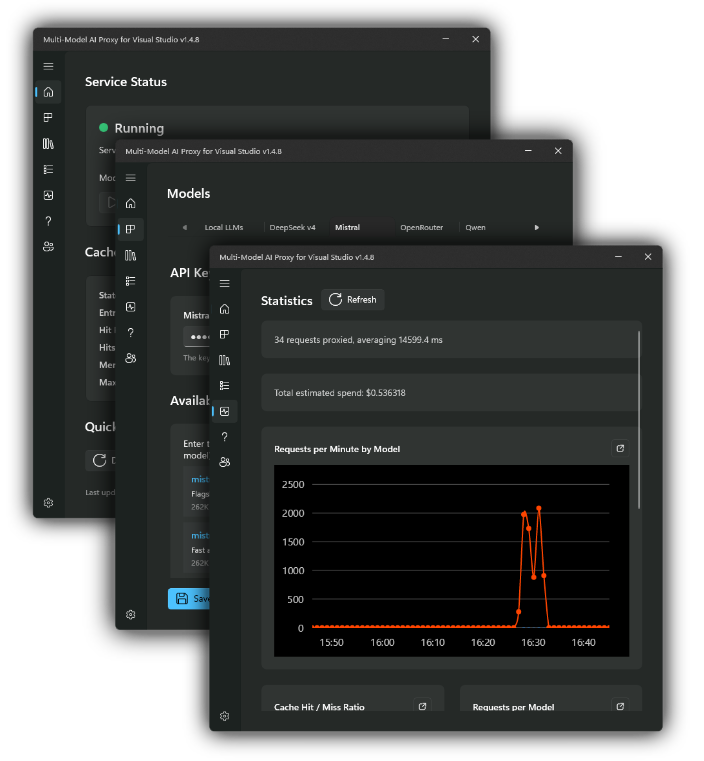
Start and stop the proxy, monitor live stats and tweak settings - no terminal required. Overview, Stats, Models, Cache, Logs and Settings pages.
Provider routing engine
Model name → provider lookup, request translation to OpenAI format, response translation back - completely transparent to the IDE.
Reasoning cache
In-memory and on-disk caching of reasoning responses with configurable TTL and entry limits - duplicate API calls disappear.
Local LLM discovery
Auto-discovers models from up to 10 local servers at startup, re-discovers on change - connection testing built into the dashboard.
REST API & live logs
Full management API to inspect and control the proxy, plus a ring-buffer log of every request - provider, model, duration and cache hits.
Model override
Force every request through one model from the system tray - across all connected IDE instances - with clear indicators and one-click reset.
Shipped to the Store, growing with the ecosystem
Multi-Model AI Proxy is live on the Microsoft Store - a product that keeps pace with the AI ecosystem as new models and providers appear. New model families are added as they launch, and local LLM support means your hardware investments keep paying off.
It's the hayman.dev approach in a single install: identify a real gap, engineer the transparent fix, and keep shipping improvements - straight to the Windows Store.
Multi-Model AI Proxy
Cloud + local
Two proxies - port 5000 for cloud providers, port 6000 for your network.
Microsoft Store
Installed via the Windows Store - automatic updates included.
Keys stay local
API keys stored on your PC, used only to authenticate to providers.
Need a tool like this for your team?
From native Windows apps to AI infrastructure to full SaaS platforms, we engineer software that ships, survives scrutiny and keeps getting better.
No hard sell • A real engineer on the first call