
Your Copilot. Every model you want.
A local proxy that plugs every major AI provider into Visual Studio 2026 GitHub Copilot - DeepSeek, Mistral, Mimo, Z.ai, xAI, Qwen, OpenRouter's 300+ models - plus local LLMs running on your own hardware.
- 7+ providers
- Local LLMs
- Reasoning cache
- WinUI 3 dashboard
- Microsoft Store
0+
AI providers, routed from one proxy
0+
Models reachable via OpenRouter
0
Proxies - cloud (5000) & local (6000)
0
Restarts needed to switch models
Copilot is the agent. It shouldn't limit the models.
GitHub Copilot in Visual Studio 2026 is a brilliant agent - but it only speaks to a handful of models. The latest and best models from DeepSeek, Mistral, Mimo, Z.ai, xAI and Qwen simply aren't in the chooser.
Multi-Model AI Proxy fixes that. Visual Studio's BYOK (Bring Your Own Model) window already knows how to talk to Ollama - so the proxy presents itself as an Ollama endpoint, then silently routes every request to the provider you actually chose.
Visual Studio thinks it's chatting to Ollama. You know it's chatting to Grok, GLM, Qwen or a model on your own network. Copilot stays your agent - the models just got a lot more interesting.
Copilot talks Ollama. The proxy talks to everyone.
-
code
Visual Studio 2026
Copilot BYOK points at the proxy's Ollama-compatible endpoint.
-
hub
The proxy
Inspects the model name, looks up the owning provider, translates to OpenAI format and forwards.
-
cloud_done
The providers
DeepSeek, Mistral, Mimo, Z.ai, xAI, Qwen, OpenRouter - or your local LLM server.
A proxy that thinks about the boring parts
Multi-provider routing, a reasoning cache that saves you money, and a dashboard that shows you everything - without a single restart.
Multi-provider routing
DeepSeek v4 Flash & Pro, Mistral, Mimo, Z.ai (GLM), xAI (Grok), Qwen and OpenRouter's 300+ models - all from the Copilot model chooser.
Local LLM support
Point the proxy at Ollama, llama.cpp, LM Studio or vLLM on your network - up to 10 servers, models auto-discovered.
Reasoning cache
Caches model reasoning in memory and on disk - similar questions return instantly and duplicate API calls disappear. Configurable TTL.
WinUI 3 dashboard
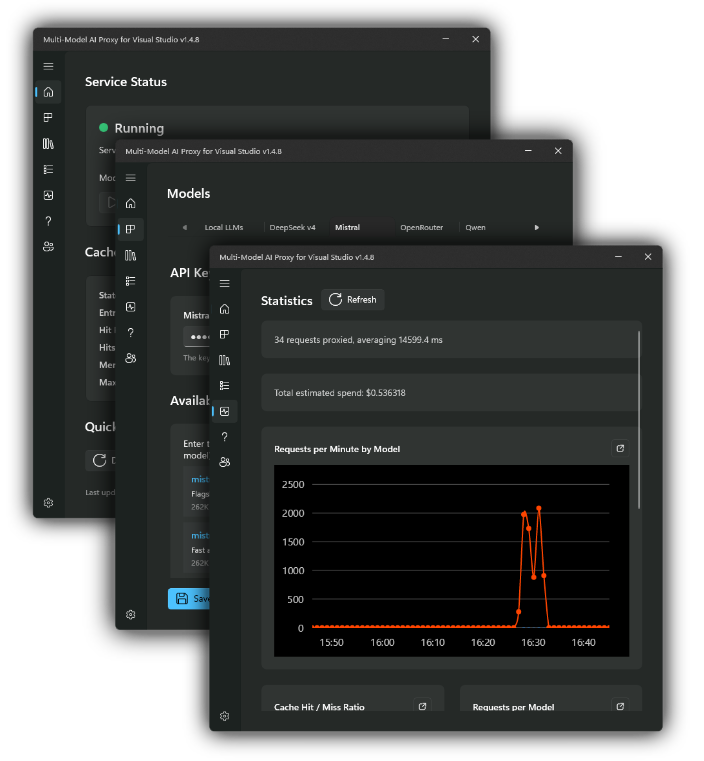
Start and stop the proxy, watch live stats, browse the request log and tweak settings - no terminal required.
Model override
Right-click the tray icon to force every request through one model - across all connected IDE instances, until you clear it.
REST API & live logs
A full management API to inspect and control the proxy, plus a live ring-buffer log of every request - provider, model, duration and cache hits.
One proxy, two doors
The cloud proxy on port 5000 handles every cloud provider. The local proxy on port 6000 handles your local network LLMs. Copilot connects to whichever door you need.
VS Copilot (BYOK)
localhost:5000
Proxy routes & translates
OpenAI format • reasoning cache
DeepSeek
Mistral
xAI Grok
OpenRouter
Z.ai GLM
Qwen
Mimo
& more
VS Copilot (BYOK)
localhost:6000
Local proxy & model map
Models auto-discovered from your servers
Local LLM server
llama.cpp • Ollama • LM Studio • vLLM
Your models. Your hardware. Your data.
Run a local LLM server on Linux, macOS or Windows - on a dedicated machine, a VM, or even WSL on your dev box - and pipe all your chat requests through Visual Studio via the Bring Your Own Model feature.
The proxy acts as a transparent bridge: Copilot talks to localhost:6000, and the proxy forwards to the correct server on your network. No API keys, no per-token bills - and nothing leaves your network.
Offload LLM resource usage from your main development machine - then reach it remotely over VPN or zero-config tools like Tailscale.
- check_circle llama.cpp, LM Studio, Ollama & vLLM supported
- check_circle Up to 10 local servers, models auto-discovered
- check_circle Switch models by restarting your server - the proxy re-discovers automatically
Visual Studio Copilot
BYOK → localhost:6000/v1
Local proxy (in-process)
Model name lookup → forwards to your server
Local LLM server
my-local-server:8000 - llama.cpp, Ollama, LM Studio or vLLM
Private
Prompts never leave your network.
Free
No API keys, no per-token bills.
Hybrid
Cloud and local models side by side.
New models in five minutes
If you can add an Ollama endpoint, you can add every provider on this page.
-
01
Install & add your keys
Install from the Microsoft Store, then add API keys for any provider on the Models page - DeepSeek, Mistral, Mimo, Z.ai, xAI, Qwen or OpenRouter.
-
02
Point Copilot at the proxy
In Visual Studio 2026, open Manage Models, choose the Ollama provider and set the URL to http://localhost:5000/.
-
03
Add models & code
Add the model IDs you want (e.g. deepseek-v4-flash), switch between them in the Copilot chooser - and start coding.
Setup, models and troubleshooting
Full getting-started guide with screenshots, the Local LLM setup walkthrough, a reference of every supported model ID, and answers to the questions everyone asks.
Getting started
Seven illustrated steps from Store to first prompt.
Local LLMs
Server setup, proxy setup and VS BYOK wiring.
Model reference
Every supported provider and model ID, listed.
Troubleshooting
Port conflicts, model 400s and connection refused.
Plug every model into your Copilot
Download Multi-Model AI Proxy from the Microsoft Store and take your pick of the best AI models - cloud or local.
Built by hayman.dev - your agent, your models