
 Product • Windows Desktop
See everything your PC is doing - without opening Task Manager
Resource Watchtower is a lightweight, native Windows monitoring app. CPU, GPU, memory, disk, network and processes - live charts, pop-out windows and history logging, all from a quiet icon in your system tray.
- 6 live monitors
- GPU & LLM Mode
- 100% local
- 5 languages
- Microsoft Store
0
Resource categories monitored live
0
Languages, switchable on the fly
0%
Cloud - your data never leaves the PC
0
Click from the tray to full analytics
Task Manager tells you what's using your PC. Watchtower tells you why.
When something pegs your CPU or your GPU fan spins up, the built-in tools give you a snapshot - then forget everything the moment you look away.
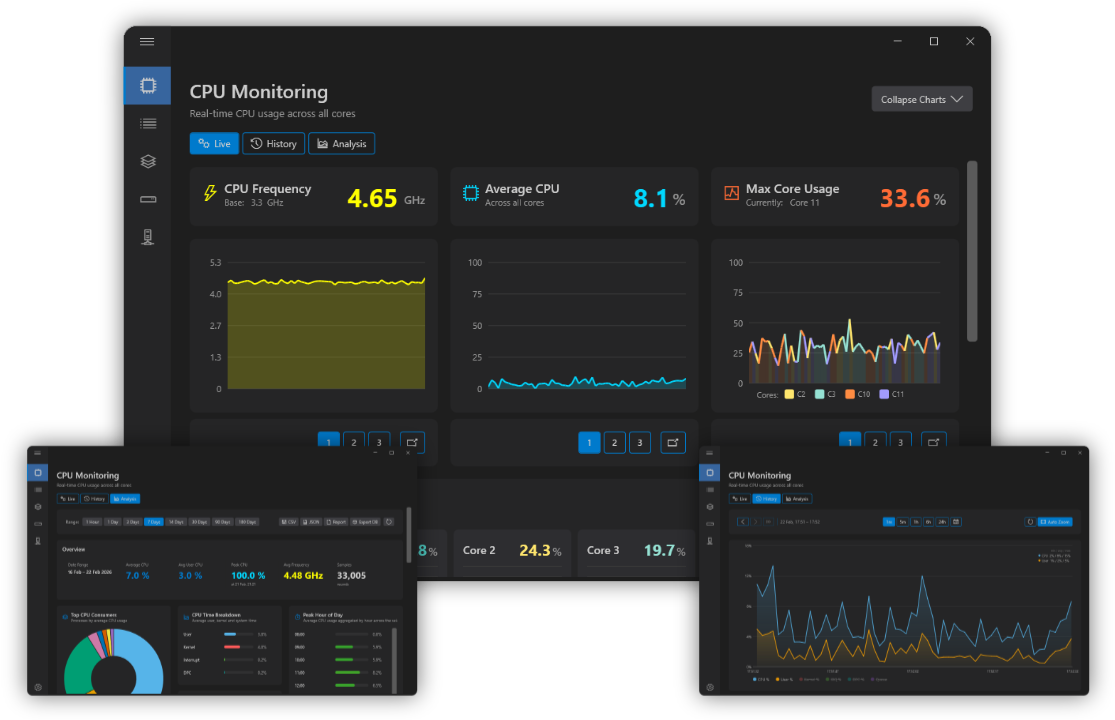
Resource Watchtower keeps a live picture of every subsystem: per-core CPU, GPU usage and VRAM, memory, disk activity, network traffic and the processes behind it all - with history you can scroll back through and export.
Built by hayman.dev as a native WPF application on .NET 10, it's deliberately small, deliberately local, and designed to live quietly in your tray until you need it.
The people who watch their machines
-
code
Developers
Spot runaway builds, debug thermal throttling and keep local AI workloads honest.
-
admin_panel_settings
IT professionals
Diagnose machines remotely and record resource usage over time for reports.
-
speed
Power users
Keep an eye on performance without the overhead of heavyweight monitoring suites.
Everything Task Manager should have been
Six live monitors, detachable charts and history you can export - a monitoring tool that works the way you do.
Real-time monitoring
CPU (per-core), memory, disk, network, processes and GPU - live charts with concise summaries for rapid diagnostics.
GPU analytics
Usage, VRAM as a colour-coded bar, temperature where supported, per-engine breakdowns and top GPU processes.
LLM Mode detection
Watchtower flags when local AI tools - Ollama, LM Studio, Unsloth Studio - are actively using your GPU, and shows which app.
Pop-out windows
Detach any chart into its own window - always-on-top, position and size remembered between sessions.
History & CSV export
Record resources over time - the last hour, day, week or longer - and export the data to CSV for analysis.
Tray-first & multilingual
Lives in the system tray with quick actions and notifications. Start with Windows, cycle 5 languages on the fly.
Your GPU, finally speaking English
A dedicated GPU tab shows live usage, VRAM as a colour-coded bar that shifts green → amber → red, temperature where your hardware supports it, and a per-engine breakdown across 3D/Compute, Copy and Video Decode/Encode.
Running local AI? Watchtower detects Ollama, LM Studio and Unsloth Studio on the GPU and lights up an LLM Mode Active indicator - including which application is running and its GPU compute usage.
- check_circle VRAM usage with colour-coded thresholds
- check_circle Per-engine breakdown: 3D, Compute, Copy, Video
- check_circle GPU history stored like CPU and memory
- check_circle Pop-out GPU windows with live mini charts
Watching in under a minute
No accounts, no cloud, no configuration marathon.
-
01
Install from the Store
Grab Resource Watchtower from the Microsoft Store - a small, native install with no bloat.
-
02
Launch from the tray
It sits quietly in your system tray - with startup support and quick actions one click away.
-
03
Pop out what you need
Detach the charts you care about, enable logging, and keep watching - always-on-top if you like.
Stuck? We're an email away
System requirements, common questions, troubleshooting and contact details - everything you need to get the most out of Resource Watchtower.
FAQ
Data privacy, logging, languages, LLM Mode and more.
Troubleshooting
Tray icon, GPU temperature and history quirks.
Requirements
Windows 10/11, small footprint, Store or local build.
Contact
Real engineers answer - no ticket black holes.
Start watching your machine
Download Resource Watchtower from the Microsoft Store and see what your PC is really doing - GPU included.
Built by hayman.dev - native, local, and always watching