
Your emulator's files, inside Visual Studio
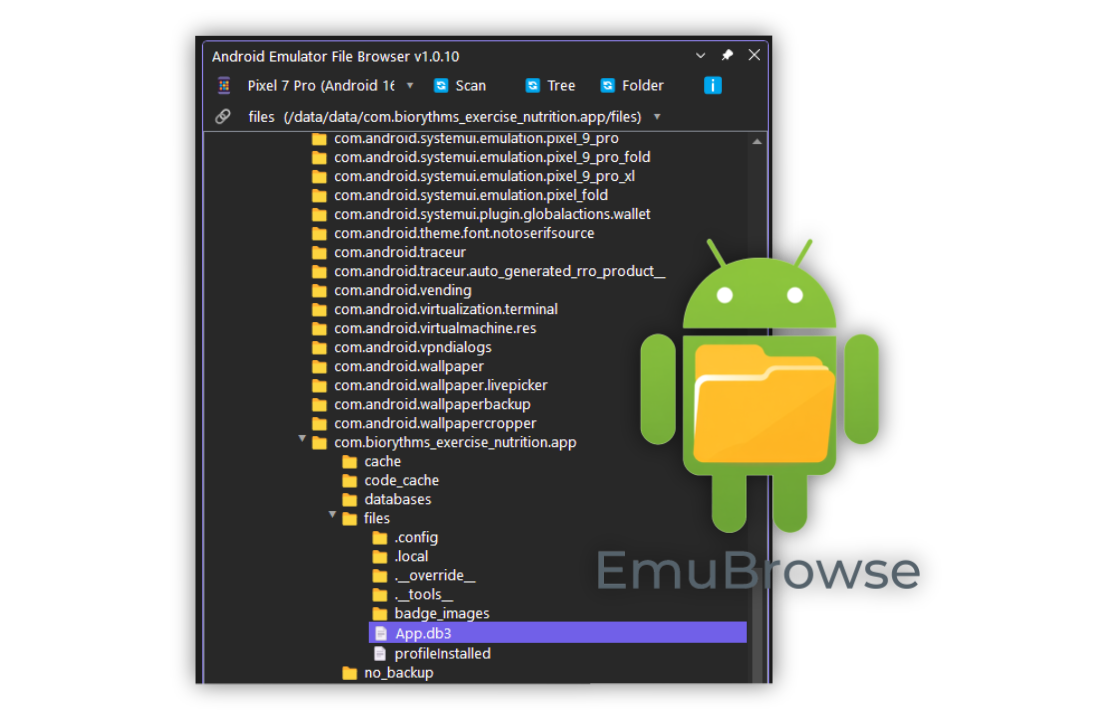
Browse the filesystem of a running Android emulator - or a USB-connected device - directly in a dockable Visual Studio window. No Android Studio, no command-line pulls, no context switching.
- ADB-powered
- Recursive downloads
- Root support
- 100% local
- Free
0
Visual Studio versions - 2022 & 2026
0
Android Studio launches needed
0%
Local - ADB only, no cloud
0
Dockable window, anywhere in your layout
Android Studio's file explorer isn't where you work
The Device File Explorer in Android Studio is slow, resource-heavy - and completely
unavailable when you're developing in Visual Studio. The alternative is firing up a
terminal and remembering arcane adb pull commands every time you need a file.
Android Emulator File Browser puts the device filesystem where your cursor already is: a standard Visual Studio tool window you can dock anywhere in your layout. Browse the full tree, download files or entire folders, and open files with a double-click.
Built by hayman.dev as a VSIX extension with a shared core library - it talks to your emulator through ADB, and nothing else. No cloud, no telemetry, no sign-up.
The developers who live in VS
-
phone_android
Mobile developers
Inspect app data, pull logs and ship test files between your machine and the emulator.
-
devices
Testers & QA
Verify app data on physical devices, grab screenshots and deliverables without leaving the IDE.
-
folder_open
Anyone debugging devices
Root support and full filesystem access when you need to see what's really on the device.
Everything ADB can do, in a window you can dock
A tool window with the device's filesystem - and the actions you actually need.
Live device browsing
Connect to any running emulator or USB-connected device via ADB - with a toolbar dropdown to switch between devices instantly.
Full filesystem access
Browse the complete directory tree of your device - with optional adb root for protected directories.
Download files & folders
Copy individual files or recursively download entire folders to your drive - no more remembering adb pull syntax.
Open in VS
Double-click a file on your device - it's extracted and opened via Windows' default handler. Right in your workflow.
Folder shortcuts
Bookmark frequently accessed folders for one-click navigation - your device paths, remembered.
Theme-aware UI
Full dark and light theme support - themed toolbars, tree views and dropdowns that match your Visual Studio theme exactly.
Browsing in under a minute
If ADB can see your device, this extension can browse it.
-
01
Install
Grab it free from the Visual Studio Marketplace - or install straight from Extensions Manager inside VS.
-
02
Connect a device
Start an Android emulator, or connect a physical device with USB debugging enabled.
-
03
Open the window
Views → Android Emulator File Browser - dock it anywhere in your layout.
-
04
Pick your device
Select the emulator or device from the phone icon dropdown in the toolbar.
-
05
Browse
Double-click folders to explore, double-click files to open them - done.
Three things, then you're in
Visual Studio
2022 or 2026 - Community, Professional or Enterprise.
Android SDK platform-tools
adb.exe on your PATH, or in the standard SDK location.
A device
A running emulator, or a physical device with USB debugging enabled.
Your device. Your machine. Nobody else.
The extension communicates only with your locally attached Android devices via the
Android Debug Bridge (ADB). No data is sent to any external server - no
telemetry, no accounts, no sign-up. Settings are stored locally in
%AppData%\AndroidFileBrowser\config.json.
Local only
ADB to your own devices, nothing more.
Free
No licence keys, no freemium walls.
Supported
Changelog-driven releases, updated through the Marketplace.
Stuck? Start here
Our support page covers requirements, getting started, installation, troubleshooting and privacy - everything from the Marketplace FAQ, on our own site. If it's not answered there, we're an email away.
"ADB not found"
Install Android SDK platform-tools, or add the path to adb.exe to your system PATH.
"Device offline"
Check USB debugging is enabled and accept the RSA key authorisation prompt.
"Permission denied"
The app attempts adb root automatically - if your device doesn't support root, protected directories stay protected.
Window not appearing
Open View → Other Windows → Android Emulator File Browser. If missing, reinstall.
Bring your device files into Visual Studio
Install from the Visual Studio Marketplace and browse, download and open Android files - without ever leaving your IDE.
Built by hayman.dev - native, local, and always in your workflow